
Continuous Integration for Swift Packages in Azure DevOps

· 4 min read
Scottie Enriquez
Director, Cloud FinOps at SiriusXMLos Angeles, CA

Overview

I use Azure DevOps for building CI/CD pipelines for professional projects. Given the GitHub integration and broader feature set, I’ve started using it instead of Travis CI for my open-source projects too. For most technology areas, there’s a wide set of pre-built tasks that can be leveraged to build robust pipelines quickly. There are several tasks for compiling and publishing iOS applications using Xcode on transient macOS virtual machines.

However, in the spirit of using Swift like a general-purpose language, I wanted to use a Linux build server, a more industry-standard approach for CI/CD. In my previous post, I described how I set up a Swift executable package to be more testable. This pipeline provides continuous integration for it. Azure Pipelines, which powers CI/CD in Azure DevOps, is scripted in YAML. It also supports integrating shell commands to be run on the virtual machine.
Creating a Swift 5.2 Executable with Unit Tests

· 4 min read
Scottie Enriquez
Director, Cloud FinOps at SiriusXMLos Angeles, CA

Background

To better learn Swift, I’ve been trying to use it as a truly general-purpose programming language instead of purely iOS development. I’m currently building an iOS app that requires multiple versions of the same vector graphics (SVGs). I couldn’t find an open-source solution for my needs, so I decided to start scripting. Typically, I would have used Python or Node.js, but I powered through with Swift in the spirit of immersion.

Getting the initial project structure and unit tests set up took some research, so this quick guide will outline how I’ve been structuring my codebases for executable packages. Outside of iOS development, Swift’s documentation isn’t as robust as Python or Node.js, given the age difference. This blog post’s objective is to merge a lot of useful knowledge I found across forums.

Using Repl.it in a High School Classroom

· 5 min read
Scottie Enriquez
Director, Cloud FinOps at SiriusXMLos Angeles, CA

Background

I co-teach an advanced placement computer science class at Heights High School in Houston with the TEALS program. The curriculum utilizes the Java programming language and has an emphasis on object-oriented programming. From a school IT system perspective, we have limited options for the software we can distribute to the students’ laptops. During my first year of volunteering, we opted to use BlueJ for the first couple of months before exposing them to Eclipse, a more heavy-duty integrated development environment. Both editors have their challenges and limitations for novices, so we began to evaluate several other options, including Visual Studio Code. After considering numerous factors, including the complexity of installation, editor features, and accessibility, we opted to try a radically different option: Repl.it.

Testing the PINEBOOK Pro as a Daily Driver

· 3 min read
Scottie Enriquez
Director, Cloud FinOps at SiriusXMLos Angeles, CA

Hardware

For 200 USD, the laptop is extremely well-made. The keyboard is comfortable for typing (although PINE64 only had the ISO keyboard model available which is an adjustment for me). The body is made out of metal and doesn’t feel cheap. The sound is serviceable though one of the weaker parts of the laptop. I consistently get download speeds of up to 50mbps over AT&T fiber at home. The battery life has been good so far. There are no glaring design flaws to speak of. Here’s an overview of the specs:

  • Rockchip RK3399 SOC with Mali T860 MP4 GPU
  • 4GB LPDDR4 RAM
  • 1080p IPS Panel
  • 64GB of eMMC
  • Lithium Polymer Battery (10000mAH)
  • WiFi 802.11 AC + Bluetooth 5.0
  • Front-Facing Camera (1080p)

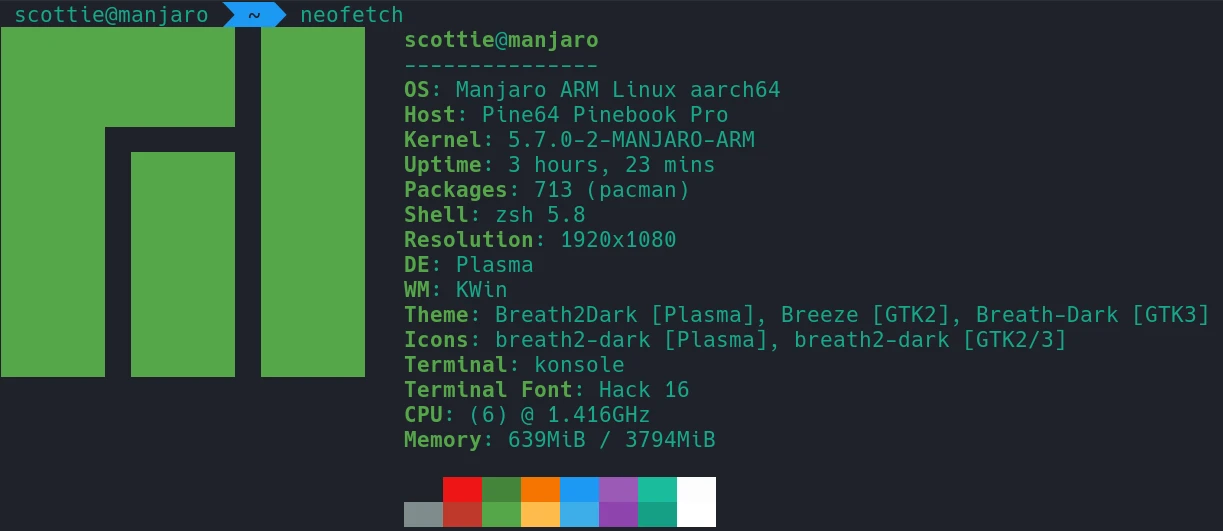
The laptop ships by default with Manjaro KDE for the operating system: neofetch

Creating College Football Recruiting Database on AWS Athena

· 6 min read
Scottie Enriquez
Director, Cloud FinOps at SiriusXMLos Angeles, CA

About College Football Recruiting

Despite being played by amateur student-athletes, college football has become a multi-billion dollar industry. Most likely due to the emotional connection to an academic institution and the incredibly entertaining and volatile lack of parity and consistency amongst teams, college football fans tend to be even more diehard than their NFL counterparts, particularly in the South. Though college football is played by undergraduate and graduate students, players are scouted as recruits as early as middle school. These recruits are evaluated based on several factors that indicate their success at both the collegiate and professional levels of football. Whether physical attributes like height and weight or skill sets like blocking and catching, all of these attributes plus countless others are synthesized into a rating. Recruits are then offered by universities culminating in commitments and signings. A good recruiting class can be an indication of future success for a college football team provided that the coaching staff develops talents as expected.

Source Code

This repository is a set of Python and shell scripts to fetch and process publicly available data from 247 for non-commercial, personal data analysis use to be done using AWS Athena. It’s co-authored by Callen Trail. As is the nature of web scrapers, the HTML parsing code is brittle. If the page structure changes on the site, the scripts will need to be modified. The process is split into three stages.

Building a React Widget for Mendix 8

· 4 min read
Scottie Enriquez
Director, Cloud FinOps at SiriusXMLos Angeles, CA

Use Case, Source Code, and Demo Site

For a weekend project, I wanted to build a nontrivial Mendix widget that required additional NPM packages, interacted with entity attributes, and had internal React state not managed by Mendix entities. Having just used the Ace editor to build a querying environment for my fantasy football league’s databases and views, I thought building similar functionality in a Mendix application would be an excellent fit.

The source code is hosted on GitHub. I’ve also included the final .mpk file (version 1.0.2) as well. The demo site can be found here.

Visual Studio Live 2019: San Diego

· 14 min read
Scottie Enriquez
Director, Cloud FinOps at SiriusXMLos Angeles, CA

Contents

Visual Studio Live in San Diego was an amazing opportunity to learn about new Microsoft technology like Azure’s artificial intelligence offerings and .NET Core 3.0. I attended some talks about leadership and Agile as well. I’ve put together several proofs of concept and documented what I learned about:

  • Azure Cognitive Services
  • ASP.NET Core Health Checks and Startup.cs Inline Endpoints
  • .NET Core CLI Tooling for AWS Lambda
  • .NET Core 3.0 Linux Worker with systemd Integration
  • Windows Subsystem for Linux 2 and Windows Terminal
  • The Dynamics of a Healthy Team
  • Goodhart’s Law and the Hawthorne Effect

SonarCloud for C# Projects with Travis CI

· 4 min read
Scottie Enriquez
Director, Cloud FinOps at SiriusXMLos Angeles, CA

Example SonarCloud/SonarScanner C# Integration for Travis CI

SonarQube is a very powerful source code continuous inspection tool. It’s incredibly valuable to have integrated into a project’s CI/CD pipeline to help maintain code quality and prevent issues. In the process of adding this to some existing open-source C# projects, I discovered that there’s not quality, up-to-date documentation on integrating C# inspection with Travis CI. This GitHub project serves as a functioning example.